


Managing files on paper slows down modern private investigators and puts crucial legal cases at risk.
Start your free trial of CROSStrax today and discover how digital evidence management transforms your investigative work.
Modern digital evidence management for investigators is the structured process of collecting, storing, securing, and sharing electronic case files to protect the chain of custody. By replacing old paper files with secure cloud-based systems, investigators can easily organize video files, photos, and records in one safe place. This transition helps investigative firms stay organized and scale their businesses safely while ensuring all records are fully admissible in court. Using dedicated software for private investigators keeps critical data safe and helps team members collaborate on active cases from anywhere in the field.
You may wonder how to move your physical records to a secure electronic platform without losing track of crucial files. Transitioning to a secure system is easier than it looks when you follow the right steps. The path begins with understanding the core operational issues of physical tracking in The Growing Challenge of Paper-Based Evidence Management.
Digital Evidence Management For Investigators: The Growing Challenge of Paper-Based Evidence Management
For many years, private firms used paper files and simple sheets to track facts. But these old ways cannot keep up with modern caseloads. Today, files are mostly electronic, and keeping them on paper or in loose files creates big risks. If your firm still relies on paper, you face a slow workflow and risks of lost data.
The Rise of Large Electronic Case Files
Modern cases rely on electronic data more than ever before. In fact, research shows that digital items now play a role in about 90% of cases. A single case can easily hold hundreds of gigabytes of information. This data includes high-resolution video, phone logs, and GPS files. Saving, tracking, and viewing these large files by hand is nearly impossible without the right evidence collection software.
Risks of Lost and Mishandled Records
Paper records are easy to lose, damage, or mix up. A single lost sheet can ruin a case in court. Also, keeping files on local drives or paper makes it hard to secure the files. Anyone who walks by a desk could see private case details. This lack of security makes it hard to prove who had access to the files and when.
How Manual Methods Create Bottlenecks
Manual tracking slows down every step of a case. Finding a specific photo or note in a pile of paper takes too much time. This slow speed makes it hard to share files with attorneys quickly. By using automated systems, teams can get much faster retrieval times and save many staff hours. A slow system delays your work and keeps you from taking on new cases.
What Digital Evidence Management Looks Like for Private Investigators
Digital evidence management for investigators is the systematic process of collecting, storing, and analyzing electronic data during a modern case. To understand this field, we can look to federal standards. The National Institute of Standards and Technology defines digital forensics as the scientific process of preserving, identifying, extracting, and documenting digital evidence. Doing this work by hand or through scattered computer folders is slow and invites human error. Modern private eye firms need secure evidence collection software to handle these steps safely.
A Central Platform for Case Media
Modern cases produce massive amounts of electronic files. Investigators must gather and sort photos, surveillance videos, cell phone records, and emails. A centralized platform with cloud storage makes it easy to keep these items in one safe spot. You can tag files, search databases, and find records in seconds rather than digging through old desk drawers or multiple flash drives. This clean approach ensures you never lose a key piece of video that could prove your client’s case.
Unified Software Connections
To run a smart firm, you need your tools to talk to each other. CROSStrax supports over 1,500 application integrations to centralize digital evidence handling and case tasks. This deep connectivity means you can pull in data from email, billing tools, and web forms without manual uploads. Bringing your systems together saves valuable staff hours. It also makes sure every piece of incoming media matches the correct case file instantly. Explore CROSStrax case management features to see how those capabilities support connected investigations.
Preserving Integrity for Legal Use
Evidence must be kept safe from any changes to stand up in court. Government guidelines show that digital evidence preservation requires careful consideration of handling, labeling, and forensic laboratory protocols to maintain integrity. You can study these standards in the NIST Digital Evidence Guidelines. Using specialized software for private investigators helps you meet these strict rules automatically. Secure platforms track every file view and change, which gives you the solid proof you need for judges and lawyers.
How Automated Chain of Custody Protects Your Cases
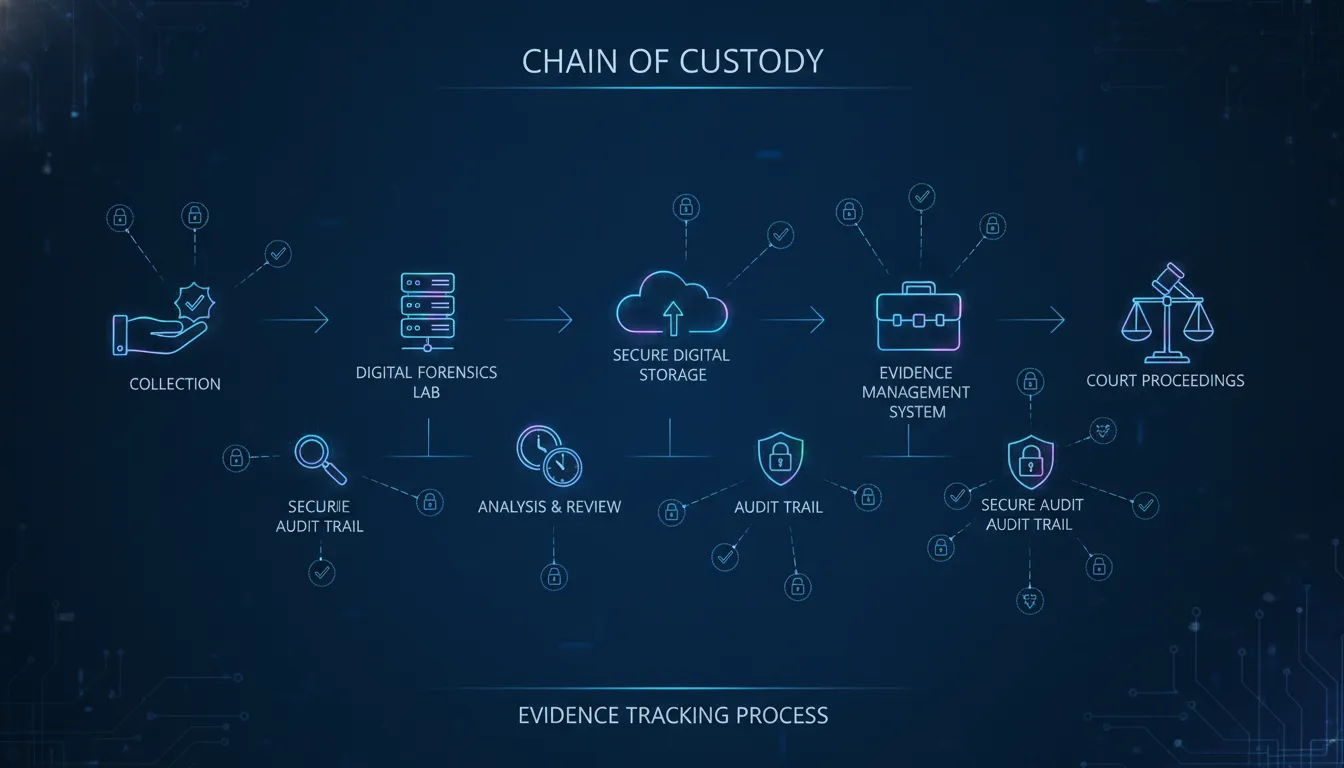
Moving from paper records to digital systems is a major step for modern firms. Paper sign-out sheets are slow, hard to track, and prone to loss. In contrast, digital systems automate the entire tracking process. This shift helps protect your active cases from evidence spoliation challenges in court. By choosing secure systems, you ensure your agency meets strict standards for law firm evidence management.
Automating Access Logs and Audit Trails
Digital systems create a complete record of every action taken. Every time a user views, downloads, or shares a file, the software logs the activity instantly. These automated logs remove the risk of human error or forgotten entries. This detailed audit trail proves who handled the files and when, which is vital for legal verification.
Verifying Integrity with File Hashing
To prevent tampering, digital tools assign a unique cryptographic signature, known as a SHA-256 hash, to each uploaded file. Any change to the file, no matter how small, will change this digital fingerprint. This process allows you to verify that your data has not been modified since its initial collection. According to guidelines from the National Institute of Justice, regular validation and software updates are fundamental to ensure the reliability and integrity of evidence.
Key Features of Secure Digital Systems
Modern platforms combine several tools to keep your data safe and admissible. A solid workflow reduces the risk of common mistakes like inadequate security backups. To secure your cases, look for these core digital features:
- Automated access logs that record all user activities without manual input.
- Tamper-evident file hashing to verify that no digital evidence has been altered.
- Secure, automated cloud backups to prevent data loss or file corruption.
- Role-based access controls to limit who can view or download sensitive case files.
Paper vs. Digital Evidence Management: A Side-by-Side Look
| Task | Paper System | Digital System |
|---|---|---|
| File storage | File cabinets with limited space, risk of fire or water damage | Secure cloud storage with auto backups and disaster recovery |
| File retrieval | Search by hand through folders, takes 10 to 30 minutes per item | Search by keyword, date, or case name in just a few seconds |
| Chain of custody | Paper sign-out sheets that are easy to skip or forge | Auto audit logs with timestamps and full user tracking |
| Report creation | Manual typing and assembly with risk of missing files | Auto templates with verified evidence included and sorted |
| Team access | One person at a time with physical copies needed | Role-based access from any device, real-time team work |
| Data security | Locked cabinets with no access logs | Full encryption plus complete audit trails on every file |
Digital systems beat paper in nearly every area that matters for private investigators. The time saved on file retrieval alone can add up to hours per week. And the security differences mean your files stay safe from loss, theft, or tampering. Using a tool built for evidence collection software gives you all these benefits in one place.

Creating Court-Admissible Evidence Reports
Every investigator knows that excellent field work means nothing if the final report fails in court. To stand up to legal scrutiny, you must present files in a structured and verified format. Using modern digital evidence management for investigators simplifies this process. It helps you turn messy folders of video clips, images, and notes into clean, compliant reports that judges and attorneys can easily use.
Building Reports with Trusted Proof
For your case files to be useful in legal trials, they must meet strict standards. The National Institute of Justice notes that software updates and regular equipment testing are key steps to keep your files reliable for court use. As detailed in their guide on digital evidence testing. Your digital evidence is admissible in court only if you prove its integrity, authenticate the files, and document every step of your chain of custody. Standardized software templates make sure your records meet these requirements without extra work.
Paper Records Versus Structured Files
Working with old paper files makes court prep hard. Disorganized stacks of papers are easy to lose, damage, or challenge in a trial. When you switch to digital files, you can build clear reports in minutes instead of hours. Modern systems group your photos, audio, and documents by case, date, and user. Choosing a platform with centralized case management keeps your data organized so you can build reports that satisfy legal teams and protect your professional credibility.
Security and Compliance in Digital Evidence Management
Your team must protect digital evidence with the highest security levels. If a file is altered, you lose its power in court and damage your firm’s name. Working with a secure cloud-based system keeps your files safe and builds trust with your clients.
Protecting Your Case with Cloud Security
Modern investigators face high security risks when they store files on local hard drives or simple servers. If a local drive fails or gets hit by malware, your evidence is gone. Inadequate backups leave your files open to permanent loss, which is why secure cloud storage is essential for any professional investigative firm.
A secure platform uses SOC 2 compliance standards and clear data controls to protect your files. Your system should encrypt files both when they sit on a server and when they travel over the web. This level of protection is key to maintaining law firm evidence management standards for legal proceedings.
How Secure Systems Safeguard Your Evidence
A safe system does more than just store your files. It guides your security workflow so you can use the files in court with absolute trust. The National Institute of Justice notes that digital evidence systems require validation, proper upkeep, and software updates to ensure evidentiary integrity (source: National Institute of Justice). When you look for software for private investigators, look for these key security tools:
- Role-Based Access: Set strict controls so only approved team members can view or edit files.
- Data Encryption: Protect files at rest and in transit with strong security keys.
- Secure Backups: Use automatic cloud backups to prevent accidental data loss.
- Audit Trails: Log every user action to prove that nobody altered the evidence.
Frequently Asked Questions
Why should private investigators move from paper to digital evidence management?
Paper records are easy to lose, damage, or alter, which risks your entire case. Moving to a digital system improves security, speeds up file search times, and makes sharing files with clients simple. It also keeps your business efficient as your case volume grows.
How do you maintain the chain of custody with digital evidence?
You maintain a digital chain of custody by using secure software that logs every action automatically. The system must record who accessed a file, when they viewed it, and what they changed. This creates an unbroken, tamper-proof audit trail for court use.
Is digital evidence admissible in court?
Yes, digital evidence is admissible if you can prove its integrity and show a clear chain of custody. According to guidelines from the National Institute of Justice, you must test your tools and validate your software updates to make sure your evidence remains reliable for legal proceedings.
What common mistakes do investigators make with digital evidence?
The most common mistakes are failing to write down who handled a file, not making secure off-site backups, and using weak passwords. These gaps make it easy for opposing counsel to challenge your files in court. Using a dedicated case management system helps prevent these errors.
Ready to streamline your digital evidence management?
Paper-based filing systems slow down your investigations and put your critical files at risk. Delaying your move to secure cloud storage increases the chance of data loss and chain of custody challenges. Modern clients expect fast reporting and secure file handling that only a digital system can provide.
Ready to start your free trial of CROSStrax case management software? Get started with CROSStrax today to organize your digital evidence and scale your business.
